
Lootborne Items: How to Read a Stat Block and Pick Gear
Lootborne has 424 items across six rarities and five elements. Learn what each line in a tooltip means and how to compare two items properly.

Lootborne contains 424 items across six rarities, according to the official Steam store page. Every one of them shows the same kind of tooltip, and once you can read that tooltip you can judge a drop in about three seconds.
The short version: the individual stat lines are the item, and the Power score is a summary. Players who sort their inventory by Power and equip the biggest number are the players who get stuck.
What a tooltip actually tells you
An official screenshot shows a low-level belt with its full stat block:
| Line | Reading |
|---|---|
Reinforced Belt | Item name |
Belt • Common | Slot and rarity |
HP +6 (+6) | Health added |
DEF +1 (+1) | Defense added |
PARRY +1% (+1%) | Parry chance added |
Power +9 | Summary score for the item |
The bracketed numbers repeat the value in a different way, and the developer has not explained the distinction, so this page does not either. What matters is that four separate stats sit above the Power line. Two items can share a Power of 9 and still want completely different builds.
The five elements decide more than the stats do
Every item can carry one of five elemental affinities: Arcane, Flame, Frost, Holy and Shadow. Stacking pieces with the same element triggers synergy bonuses.
An official character panel shows one synergy line producing five separate effects at once: FLAME x7 granting bonuses to HP, Attack and Defense in a single block. Nothing on the item itself hints at that. The element tag is the part of the tooltip that scales hardest, and it is also the easiest one to ignore.
Practically, this means you should decide which element a character is running before you decide which item is best. Builds and presets covers how to keep several of those sets ready at once.
The inventory gives you three ways to find what you need
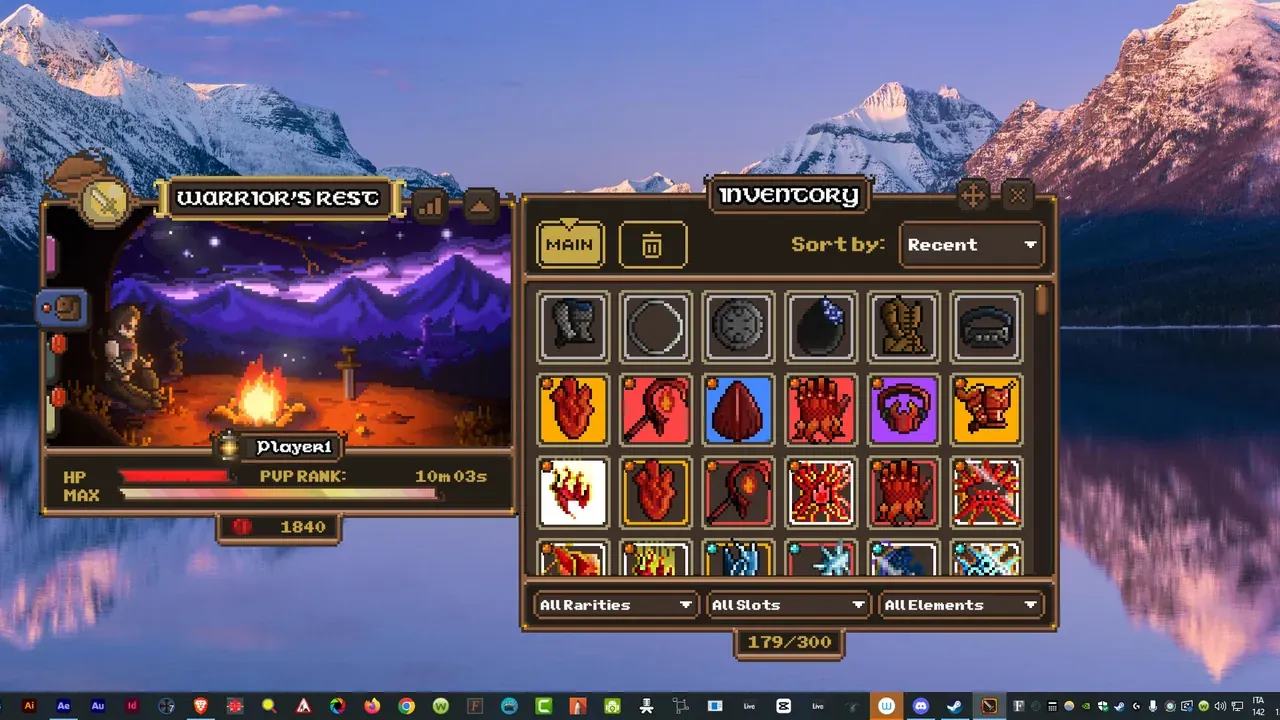
The official inventory panel has:
- Two tabs: a main tab and a bin tab for dismantling.
- A
Sort by: Recentcontrol, useful for spotting the duplicates you just picked up. - Three filters: All Rarities, All Slots and All Elements.
- A capacity counter, shown as
179/300in the screenshots.
That capacity number is worth watching. A full bag forces decisions, and the ones you make in a hurry are usually the ones you regret.
How to compare two candidate items
Run this short checklist and the answer usually appears before you reach the end:
- Element. Does the new item support the synergy you are actually running?
- The stat your build lacks. A defensive character wants Defense and Parry. A damage character wants Attack, and Crit only once Attack is high enough to make crits hurt.
- Level requirement. A stronger item you cannot equip yet is a plan, not an upgrade.
- Power. Use it as a tiebreaker, not as the first filter.
If two items pass the first three checks equally, take the higher Power and move on.
Why level 1 characters should ignore crit
The starting character has 400 HP, 12 Attack and 6% Crit. Multiplying a small number by 1.5 is still a small number. At that stage, flat Attack, HP and Defense simply do more work.
Crit becomes worth chasing later. A character shown in official screenshots reached 60% crit with over 127 Attack, and at that point crit is the strongest damage lever available. The stat did not change; the character around it did.
Duplicates are not junk
A second copy of an item you already wear has three possible uses, and only one of them is obvious.
- It can go into the forge as fuel for a rarity upgrade.
- It can be dismantled for Bloodmarks, which pay for perks.
- It can be kept for a different elemental preset, where its stats may suddenly be exactly right.
Because the forge and the perk economy pull from the same pile, the decision is worth a moment. Forge and dismantling covers that rule in full.
Related reading
- Items and their rarities for where each tier drops and which are tradable.
- Builds and stats for the six stats in context.
- Forge and dismantling for what to do with the rest of your bag.
Sources and limits
The item count, rarity count and elemental list come from the official Steam store page. The tooltip fields, inventory filters, capacity counter and character stats come from official Steam screenshots and the official release trailer. The game’s own 424-item list is not published by the developer, and third-party databases describing themselves as game-file extracts are not used here.
Related reading
items
Lootborne Item Rarities: Which Tiers Can You Trade?
Lootborne has six item rarities. Rare, Epic and battle-dropped Legendary items are tradable on the Steam Market; Common, Mythic and Ascended are account-bound.
guide
Lootborne Builds and Stats: There Are No Classes
Lootborne has no class or character choice. Builds come from stats, gear, elemental synergies and saved presets. Here is how each lever actually works.
guide
Lootborne Forge and Dismantling: What to Do With Duplicates
The forge turns spare Lootborne gear into higher rarities, dismantling turns it into Bloodmarks. Here is the four-step rule for deciding between them.